Publish Planning Elements in Other Projects
Available since InLoox 11.16
You can publish planning elements — summary activities, activities, and milestones — from one Gantt chart (source project) into another project's (target project) Gantt chart.
Publish a Planning Element to Another Project's Gantt
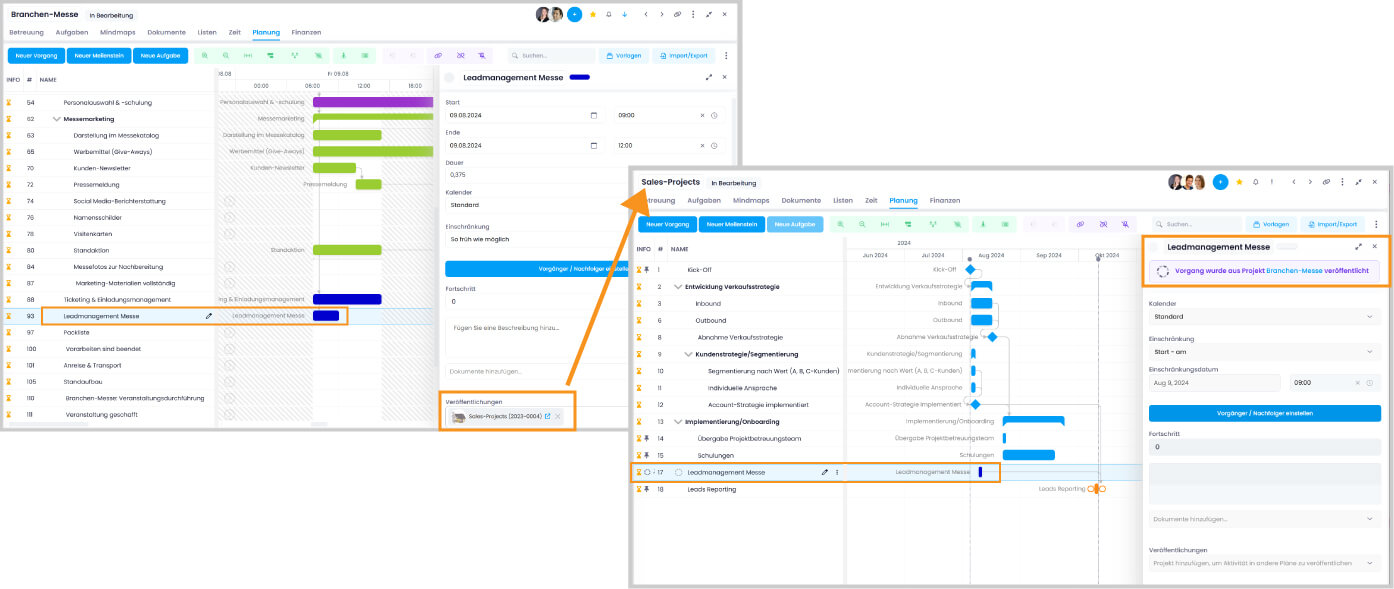
- Open the source project and click Planning.
- Select the planning element you want to publish and click the editing icon to open the side panel.
- In the side panel, click the Publication field and select the target project.
- Click the target project name, and InLoox will open its Gantt chart with the published element highlighted.
Once published, any changes to the original planning element will also be reflected in the target project's Gantt plan.
Assigned tasks are not published to the target project.
Required Permissions
To publish planning elements, a user needs the following permissions:
- Source project: Editing permissions for the planning
- Target project: Editing permissions for the planning
Users with read-only permissions can see the published elements but cannot create new publications.
Notifications
InLoox sends a notification to the project team of the target project when the Gantt chart changes — unless they have deactivated the notification feature.
Using Published Planning Elements in the Target Project
You cannot edit published planning elements in the target project, but you can set dependencies and constraints between the published elements and the target project's own planning elements.
A published planning element cannot be republished from the target project. To publish an element to multiple projects, you must do so from the source project.
Calculation of Linked Published Planning Elements
Once dependencies are set, any changes in the published planning element will affect the linked elements in the target project's Gantt chart. InLoox calculates these changes and visualizes them accordingly.
Changes in the target Gantt chart, however, do not affect the published planning element or the source project's Gantt chart.
If changes lead to constraint violations, InLoox will notify you in the Gantt chart, and you can resolve them manually.