Mandatory Login with MS365
Since InLoox version 11.13, administrators can restrict the login for all users of an InLoox account to their Microsoft 365 account.
This means that users can no longer use the conventional combination of email and password, but must log in to InLoox exclusively via their Microsoft 365 account.
Prerequisites
All affected users must have an active Microsoft 365 account.
How to set up mandatory Microsoft 365 login
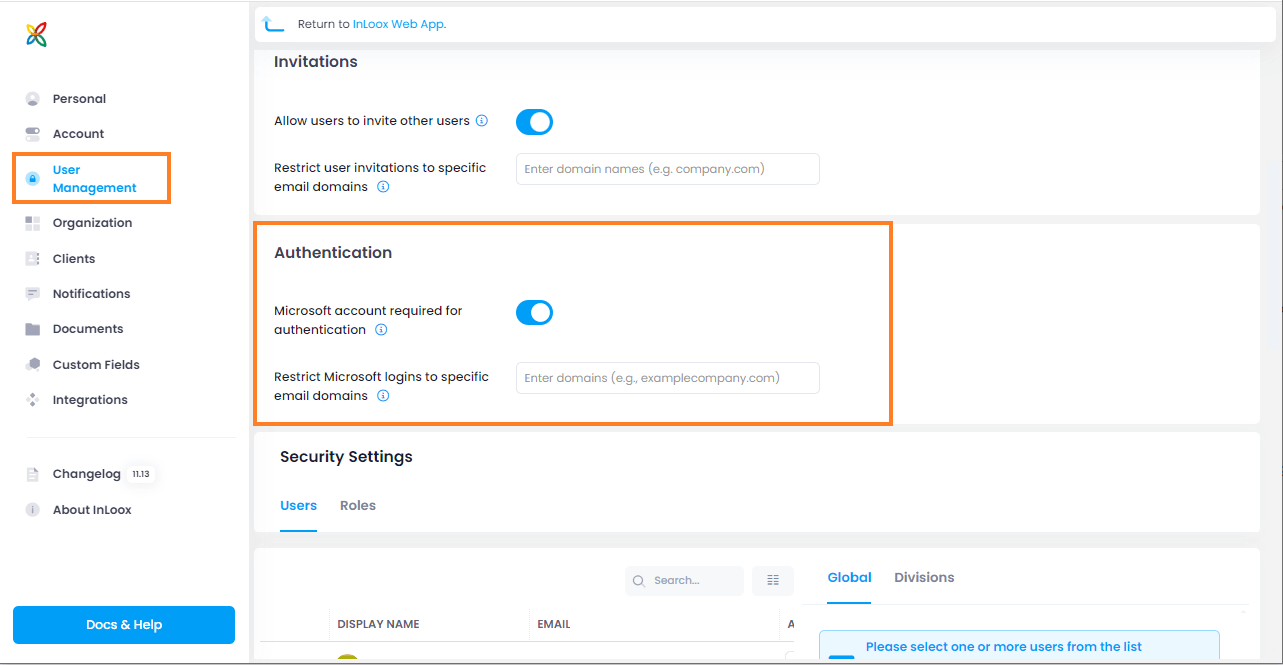
- Open the InLoox Account Settings and navigate to the User Management menu item.
- Under Authentication, activate the slider "Microsoft account required for authentication". This specifies that all users must log in to InLoox exclusively with their Microsoft account.
note
This setting does not apply to administrators.
warning
It can take up to approximately 10 minutes for the change to take effect.
- You also have the option of restricting the Microsoft login to specific email domains.