Overview: Columns in List Views
In the following overview, you will find all columns from the list views in these sections:
- Projects
- Tasks and Project Tasks
- Project Plan (Gantt)
- Time and Project Time
- Project Documents
- Project Risks
- Project Financials
- People
- Portfolios
- Workload
note
This page currently shows the most commonly used Projects columns. The remaining sections will be added in a future update.
In the InLoox Account Settings, you will find columns for:
- Organization › Skills
- Organization › Days off
- Organization › Availability
- Organization › Cost/Benefit Plan Templates
Practical Tips
- The columns listed here are the defaults. If you create custom fields, they also become available in the column selection for the respective view.
- The Column name corresponds to the display name in InLoox. The Data set specifies the technical name you need when visualizing values in dashboards or reports.
- This list is continuously updated as new features and improvements are released.
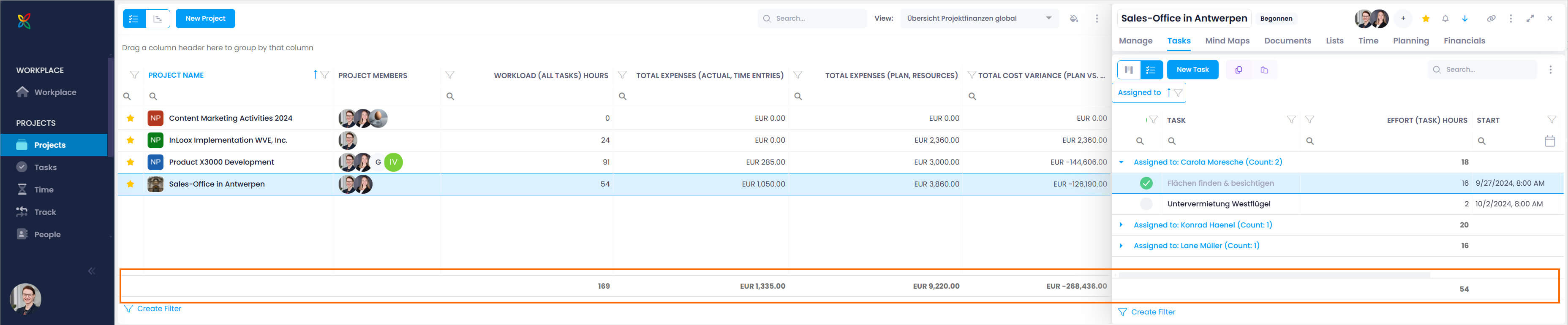
- Since InLoox version 11.14, lists display the sum total for numeric fields at the bottom. For example, showing the Effort (task) hours column will display the total of all values in that column.
Columns in the Projects List
For further details, see the help articles on the InLoox Projects List.
| Column Name | Data Set | Notes |
|---|---|---|
| Division | Project_DivisionName | |
| All Time Entries Billed | Project_AllPositionsBilled | Check mark (✓) for billed time entries |
| Count Task Items | Project_TasksCount | Displays a number |
| Count Project Notes | Project_NotesCount | Displays a number |
| Workload (All Tasks) Hours | Project_TaskItemDuration | Total effort from all tasks in hours |
| Workload (Gantt) Hours | Project_PlannedWorkAmount | Total effort from all Gantt planning elements in hours |
| Archived | Project_IsArchived | Check mark (✓) if archived |
| Image | Project_Image | Project image only, without the name |
| Financial Warning (Icon) | Project_BudgetIndicator | Budget icon instead of column name |
| Done | Project_Complete | |
| First Customer | Project_FirstCustomer | First name from "Customer" field |
| Favorite (Star Icon) | Project_IsFavorite | |
| % Complete (Actual) | Project_CompleteActual | (Completed task effort) / (Total task effort) in % |
| % Complete (Plan) | Project_CompletePlan | Based on tasks under planning elements with End < Now |
| % Complete (Plan vs Actual) | Project_CompletePlanActual | Actual % − Planned % |
| % Complete (Status) | Project_CompleteStatus | Value defined for current project status |
| Progress (Auto) | Project_ComputedProgress | Automatic progress calculation |
| Booked Hours (Project) | Project_TimeEntriesDuration | |
| Project Manager | Project_FirstManager | |
| Project Name | Project_Name | Displays project image and name |
| Project Number | Project_Number | |
| Project Start | Project_StartDate | |
| Project End | Project_EndDate | |
| Project Status | Project_ProjectStatusName | |
| Project Status in % | Project_PercentComplete | Identical to "% Complete (Status)" |
| Priority (Icon) | Project_Priority | |
| Planned End Gantt | Project_PlannedEndDate | |
| Planned Start Gantt | Project_PlannedStartDate | |
| Cost Performance | — | Traffic light indicator for actual vs. planned costs |
| Revenue Performance | — | Traffic light indicator for actual vs. planned revenue |
| Resource Cost Performance | — | Traffic light indicator for tracked vs. planned effort |
| Schedule Performance | — | Traffic light indicator for overdue tasks vs. remaining time |
| Total Expenses (Actual) | Project_AmountActualCosts | |
| Total Expenses (Plan) | Project_AmountPlannedCosts | |
| Total Revenues (Actual) | Project_AmountRevenues | |
| Total Revenues (Plan) | Project_AmountPlannedRevenues | |
| Total Margin (Actual) | Project_AmountProfit | |
| Total Margin (Plan) | Project_AmountPlannedProfit |
note
This table shows a selection of the most commonly used project columns. For the full list, visit the InLoox online help.