Documents
The Documents section serves as a document repository within your projects, where you can store and manage individual documents as well as create folders.
You can find the Documents section within a project under the Documents tab:

Setting Up Folder Structure in New Projects
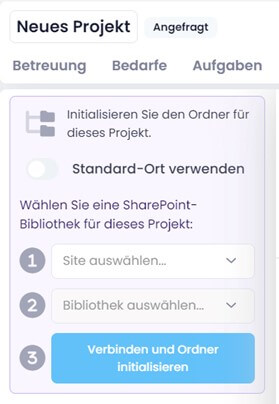
When you create a new project, you must initialize the folder structure first.
Since version 11.13, you can choose whether to use the default location defined in the settings or — if you have connected SharePoint Online — an individual SharePoint site and library (for example, a Microsoft Teams channel) as an alternative.
Make your choice and then click Initialize or Connect and initialize folder:
info
For more details on configuring your document storage, see the help article on InLoox Account Settings — Documents.