Search
Using the search bar at the top of the page, you can search your entire InLoox account.
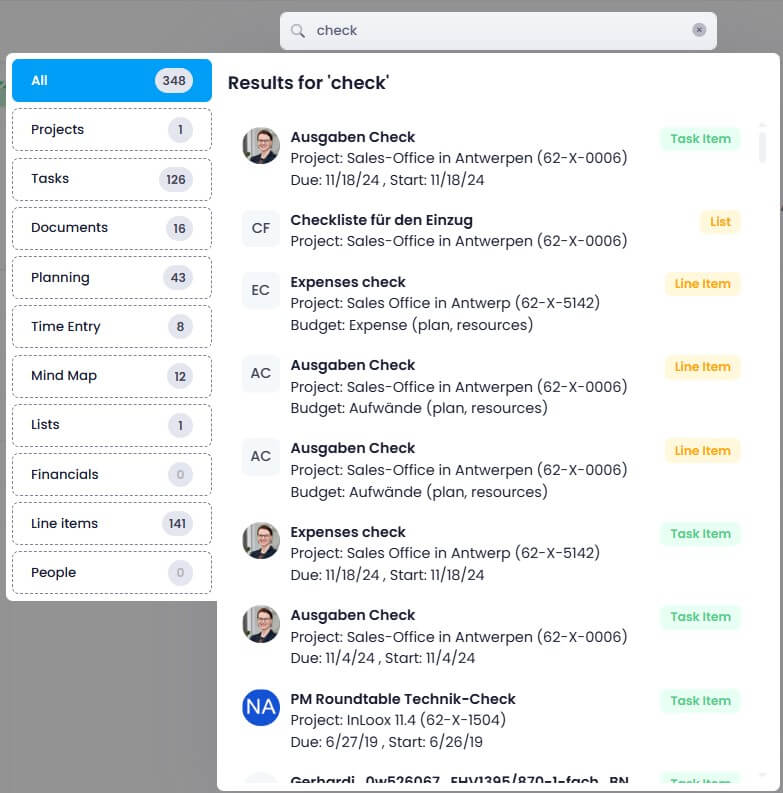
InLoox delivers results starting from the second character typed and searches the following categories:
- Projects: Name, project number, customer name, description text, and custom fields
- Tasks: Name, status name, description, contact name, project name, and custom fields
- Documents: File name, status, email sender/recipient, subject, internet link, description, project name, and custom fields
- Planning: Name, location, WBS code, description, and custom fields
- Time Entries: Name, description, and custom fields
- Risks: Name, description, and custom fields
- Mind Map: Name of mind map nodes, and custom fields
- Lists: Name of the list
- Financials: Name of the financial plan
- Financials (Line Items): Name of the line item, description, and custom fields
- People: Display name, address, company name, street, postal code, city, country, position, website, department, assistant, email, status, description
These categories on the left side of the search results menu are clickable. A maximum of 50 results per category are displayed in descending order by "last modified."
Elements Displayed in Search Results
- Projects: Project image, project name, and project number
- Tasks: Profile picture of the assigned person, project name (project number), due date, and start date
- Documents: File name, document path, project name (project number)
- Planning: Name of the planning element, project name (project number), type (task, collective task, or milestone)
- Time Entries: Profile picture, name of the time entry, project name (project number), recorded time, start date
- Risks: Name of the risk, project name (project number)
- Mind Map: Name of the mind map, project name (project number)
- Lists: Name of the list, project name (project number)
- Financials: Name of the financial plan, project name (project number)
- Line Items: Name of the budget item, project name (project number), budget type
- People: Profile picture, name of the person, email address
Clicking on a search result takes you directly to the respective element — for example, opening a time tracking entry within the associated project.
Search Options
- Multiple terms (tokenized search): When you enter multiple search terms, InLoox returns results containing at least one of the terms. For example, entering social media shows results containing "social," "media," or both.
- Partial match: You don't need to know the complete term. Even entering half a word returns hits containing that part. For example, entering pro returns results containing "project," "prototype," or "reproduction."
- Exact match: Enclose a search term in double quotation marks (e.g.,
"Aufbau Messe 2024") to get only results containing that exact phrase. This is helpful when searching for very specific terms.
Permissions for Search Results
All search results are filtered according to user permissions. Only data records to which the user has access are displayed. This ensures compliance with data protection and security requirements.
Limitations
note
The following are not searched:
- Document content
- Document paths
- Comments
- Currency, date, number, or decimal fields in custom fields
- List items (only list names are searchable)